
 Comergent
Shopify vs. WooCommerce: How Do They Actually Compare on SEO?
The short answer
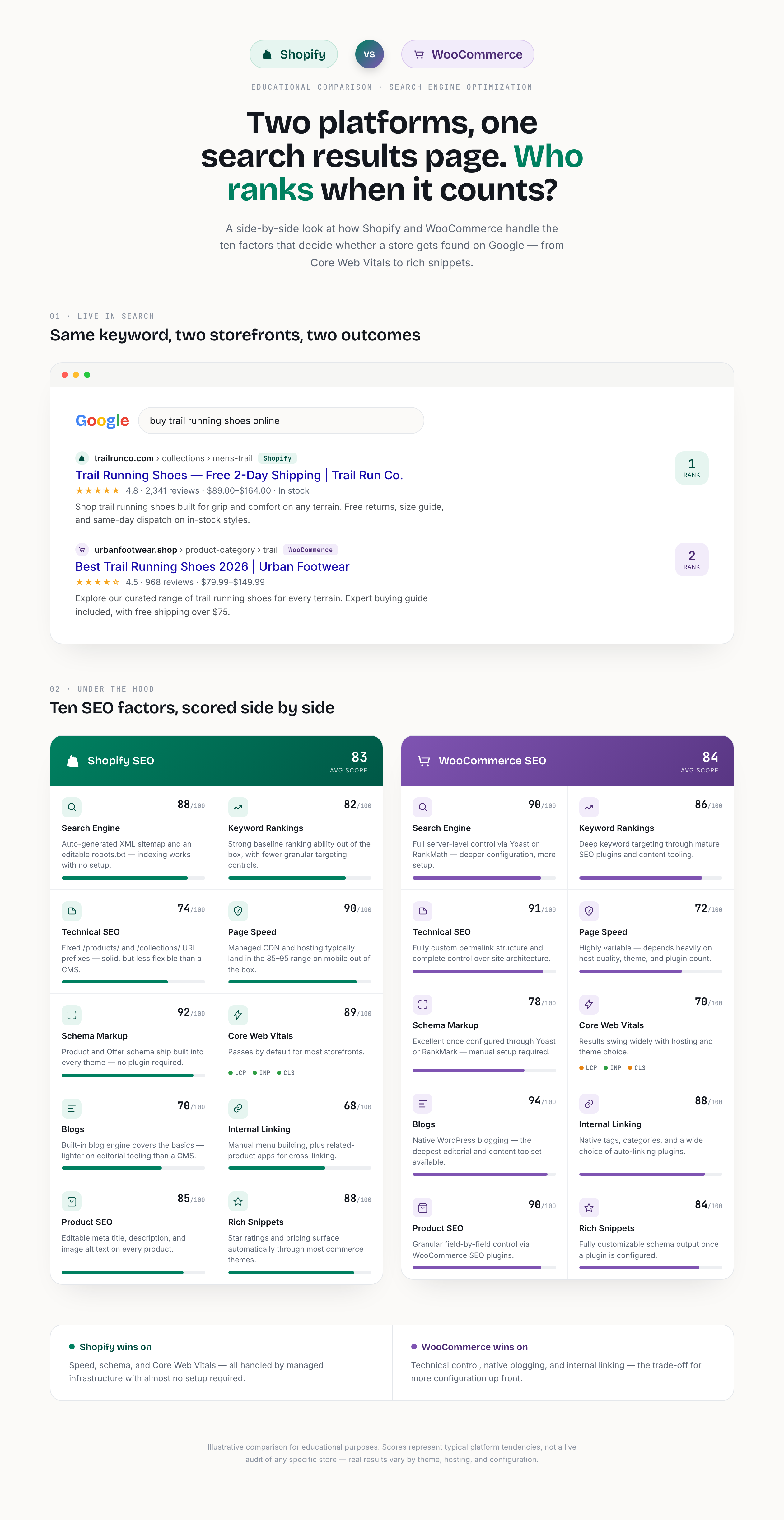
This question comes up in nearly every migration conversation, and the honest answer is it's not a blowout in either direction. Shopify and WooCommerce win on different, specific factors, and which one matters more depends on where your store is actually losing visibility today.
Shopify's advantage is infrastructure you don't have to think about. Hosted CDN and managed servers typically land new stores in the 85-95 range on mobile PageSpeed with zero tuning, Product and Offer schema ship built into every theme, and Core Web Vitals pass by default for most storefronts. None of that requires a plugin, a developer, or a decision. It's just there on day one.
WooCommerce's advantage is control. Because it's WordPress underneath, you get a fully custom permalink structure instead of Shopify's fixed /products/ and /collections/ URL prefixes, native tags and categories for internal linking, and (this is the big one) the deepest blogging and editorial toolset of any e-commerce platform, since WordPress was a publishing platform long before it was ever a store.
The trade-off is that WooCommerce's ceiling is higher but its floor is lower. Page speed and Core Web Vitals swing widely with hosting quality, theme choice, and how many plugins are stacked on top. The same flexibility that gives you control also gives you more ways to slow the site down. Shopify trades away some of that flexibility for a floor that's consistently solid without intervention.
If your SEO problem is technical (slow pages, failing Core Web Vitals, missing schema), Shopify's managed defaults fix most of it automatically. If the problem is content depth and internal linking, or you need URL structures Shopify won't allow, WooCommerce's flexibility is worth the extra setup.
Search engine access and crawlability
Both platforms are fully crawlable out of the box, but how much control you have over what gets crawled, and how, differs a lot.
| Factor | Shopify | WooCommerce |
|---|---|---|
| Robots.txt control | Editable via robots.txt.liquid, but limited control over faceted/filter URL generation | Fully editable, plus granular directives through Yoast or Rank Math |
| XML sitemap | Auto-generated at /sitemap.xml; can't exclude individual products without a workaround | Fully customizable inclusion/exclusion via SEO plugin |
| Canonical tags | Automatic on default templates; variant and filtered URLs still need manual review | Automatic via SEO plugin, with more granular per-page control |
| Crawl consistency | Managed CDN, consistent server response globally | Depends entirely on the hosting provider |
Keyword rankings and content architecture
This is where the two platforms diverge philosophically. Shopify optimizes for a predictable structure; WooCommerce optimizes for total control over that structure.
| Factor | Shopify | WooCommerce |
|---|---|---|
| URL structure | Fixed prefixes only (/products/, /collections/, /blogs/); not editable | Fully custom permalinks, any structure you choose |
| Taxonomy depth | Collections and tags; limited nested categorization | Native hierarchical categories and tags, deeper nesting |
| Content types | Products, blog posts, pages; custom types need an app | Unlimited custom post types and taxonomies natively |
In practice, the URL-structure row is the one that surprises merchants most during a migration. If a WooCommerce store has years of link equity pointing at /shop/category/product-name, moving to Shopify's fixed /products/product-name structure requires a full 301 redirect map. It's not optional, and it's not hard, but it has to be planned for. Our own migration checklist walks through exactly this step.
Technical SEO
| Factor | Shopify | WooCommerce |
|---|---|---|
| Duplicate content risk | Higher from variant and filtered-collection URLs; needs active canonical hygiene | Higher from parameter-heavy filter plugins, but more directly configurable |
| Redirect management | Native in-admin 301 redirect tool | Requires a plugin (Redirection, Rank Math) |
| Hreflang / international SEO | Native via Shopify Markets | Requires a plugin (WPML, Polylang) |
| Site-wide code access | Restricted to theme.liquid and app injections | Full server and PHP-level control |
Page speed and Core Web Vitals
| Factor | Shopify | WooCommerce |
|---|---|---|
| Baseline hosting | Managed CDN, HTTP/3, automatic image optimization | Depends entirely on the hosting tier you buy |
| Typical mobile PageSpeed (untuned) | 85-95 | 40-80, wide variance |
| Plugin bloat risk | Low; apps are fewer and review-gated | High; easy to stack 15+ plugins without noticing the cost |
| Core Web Vitals pass rate | Passes by default on most themes | Requires active tuning: caching, image compression, minimal JS |
It's almost never WordPress itself. It's cheap shared hosting plus an unmanaged plugin stack. A WooCommerce store on solid managed hosting (Cloudways, WP Engine, Kinsta) with a lean plugin list can match Shopify's Core Web Vitals. Most stores that struggle here never made that hosting decision deliberately, they just grew into the problem.
Schema and structured data
| Factor | Shopify | WooCommerce |
|---|---|---|
| Product / Offer schema | Built into every theme by default | Requires an SEO plugin (Rank Math, Yoast) or manual JSON-LD |
| Review / AggregateRating schema | Via review apps, natively integrated | Via review plugins |
| Organization / breadcrumb schema | Native | Via SEO plugin |
| Custom schema (FAQ, HowTo, etc.) | Requires an app or a theme.liquid edit | Native flexibility via plugin or custom code |
Blogging and internal linking
| Factor | Shopify | WooCommerce |
|---|---|---|
| Blog engine maturity | Basic: a single blog, limited author and category tooling without apps | WordPress-native, the most mature blogging engine of any CMS |
| Internal linking tools | Manual; no native related-posts or link-suggestion tooling | Rich plugin ecosystem (Yoast internal linking, Link Whisper) |
| Content velocity at scale | Slower for high-volume publishers | Built for high-volume, editorial-led publishing |
If your growth strategy leans on content volume and topical authority (think a media-plus-store model), this is the row that should carry the most weight in your decision, more than page speed or schema.
Product SEO and rich snippets
| Factor | Shopify | WooCommerce |
|---|---|---|
| Rich snippet eligibility (price, stock, rating) | Automatic on product pages | Requires plugin configuration, but more granular field control |
| Variant SEO (color/size URLs) | Variants share the parent product URL; not separately indexed | Separate indexable URLs per variation possible if configured |
| Google Merchant Center feed | Native Shopify app integration | Via the WooCommerce Google Listings & Ads plugin |
AI search, agentic commerce, and AEO in 2026
This is the newest, fastest-moving row in the comparison, and it's no longer optional to consider. Shoppers increasingly ask ChatGPT, Claude, Perplexity, or Gemini what to buy instead of typing a query into Google, and increasingly, AI agents complete the purchase directly. Shopify's Spring '26 'Everywhere Edition' release turned this into a platform-level feature rather than something merchants bolt on themselves.
| Factor | Shopify | WooCommerce |
|---|---|---|
| Universal Commerce Protocol (UCP) | Native, enabled by default on every store as of the Spring '26 Editions release | Available through third-party UCP implementation guides, not platform-native |
| Storefront MCP server | Enabled by default on every paid plan; higher rate limits on Plus | Shipped natively in WooCommerce 10.3 (October 2025) as an opt-in MCP layer |
| AI agent checkout | Checkout MCP in preview since May 2026; Checkout Components GA for Plus merchants | Being wired through Stripe's Agentic Commerce Protocol and the WooCommerce Store API |
| Purpose-built AEO tooling | Comergent AI, a Qressy product that tracks AI-referred orders back to source | Achievable through general AEO practice; less platform-native tooling today |
Shopify and Google introduced the Universal Commerce Protocol in January 2026. By the Spring '26 release it shipped switched on for every merchant, with no setup required. WooCommerce's equivalent, Model Context Protocol support, is real and shipping, but it lives at the plugin layer rather than the platform layer, which means it inherits the same 'depends on your setup' pattern as everything else on WooCommerce.
This is also where the comparison stops being purely academic for us. Comergent AI is a Shopify app we built specifically because AI-driven discovery needed its own tracking and optimization layer, distinct from classic SEO. If AI referral traffic is already showing up in your analytics as an unexplained bucket, it's worth reading how we think about AEO as its own discipline.
A real migration example
Gasboys.co is a federally-legal THCA and hemp storefront we migrated from WooCommerce to Shopify. The brief wasn't just 'move the store.' It required state-by-state shipping restrictions and 21+ age verification built directly into checkout, on top of the standard SEO-preservation work: full URL redirect mapping, product data migration, and metadata parity so rankings didn't reset on launch day.
“Managed to migrate our entire store without any data loss or downtime.”
Gasboys.co, 5-star Shopify Partner review, December 2025
The pattern holds across most WooCommerce-to-Shopify migrations we run. The risk was never Shopify's SEO ceiling, it was whether the URL and redirect plan was built before cutover, not after.
Common mistakes on each platform
On Shopify
- Leaving default title tags and meta descriptions unedited across every product page
- Discontinuing products without setting up 301 redirects, letting broken links pile up
- Ignoring duplicate content created by color/size variant URLs and filtered collection URLs
- Publishing thin, templated collection descriptions with no unique copy
- Misconfiguring Shopify Markets hreflang on multi-region stores
On WooCommerce
- Stacking too many plugins and quietly killing Core Web Vitals
- Running on cheap shared hosting, which turns the 'control' advantage into a liability
- Leaving default WordPress permalinks (/?p=123) instead of setting a clean structure at launch
- Skipping page and object caching, causing slow time-to-first-byte under real traffic
- Letting /shop/ archive pages, tag pages, and category pages overlap into duplicate content
When Shopify is the wrong choice
You depend on a highly specific URL structure that Shopify's fixed /products/ and /collections/ prefixes can't replicate, even with redirects. Your business is content-first (a media site with a store attached), where WordPress's editorial tooling will outperform Shopify's blog engine at real volume. You need deep, custom server-side logic (memberships, complex taxonomies) that would require expensive app workarounds on Shopify. Or you've already built a finely tuned WooCommerce SEO setup, and the migration cost outweighs Shopify's baseline convenience.
When WooCommerce is the wrong choice
Your team has no dedicated developer or ops resource to manage hosting, updates, and plugin conflicts, so flexibility turns into a maintenance burden that quietly erodes Core Web Vitals over time. You're scaling fast and need guaranteed uptime during traffic spikes without hiring for infrastructure. You want AI-agent and agentic-checkout readiness (UCP, Storefront MCP) without stitching together several plugins and protocols yourself. Or you need Shopify Plus-grade B2B, multi-store, or checkout-extensibility features without custom development.
Decision matrix
Use this as a quick gut check rather than a scorecard. Most stores will have a mix of checks on both sides, and that's normal. What matters is which list has more of your actual priorities, not more total items.
- You want technical SEO (speed, schema, Core Web Vitals) handled by the platform, not by you
- Your team doesn't have dedicated dev/ops resources for ongoing maintenance
- You need AI-agent and agentic-checkout readiness without custom integration work
- You're scaling fast and can't risk uptime during traffic spikes
- You need Shopify Plus-grade B2B, multi-store, or checkout customization
- A managed, predictable URL structure is an acceptable trade-off
- Your growth strategy is content- and publishing-led, not just product-led
- You need a fully custom URL structure to preserve existing search equity
- You have (or will hire) a developer to own hosting, plugins, and performance
- You need deep taxonomy, custom post types, or server-level control
- You're prepared to actively manage plugin count to protect page speed
- Your existing WooCommerce SEO setup is already performing well
Frequently asked questions
Neither wins outright. Shopify wins on technical SEO delivered by default: speed, schema, Core Web Vitals. WooCommerce wins on content architecture and URL control. The right answer depends on whether your store's biggest visibility gap is technical or editorial.
Yes, for the technical fundamentals. Product and Offer schema, canonical tags, and CDN-backed page speed ship by default with no configuration. What it doesn't give you out of the box is deep content architecture or custom URL structures.
It's more flexible, not automatically more friendly. WooCommerce gives you full control over URLs, taxonomies, and code, but none of that helps unless it's configured correctly, and that's exactly the setup Shopify skips by managing it for you.
Only partially. You can edit the slug after /products/, /collections/, or /blogs/, but you can't remove or change those prefixes themselves. That structure is fixed platform-wide.
It's a hard-coded part of Shopify's routing architecture, not a theme setting. There's no app or code workaround that removes it without breaking the platform's product-handling logic.
It can, but it isn't automatic. A well-hosted, lightly-plugged WooCommerce store can match or beat Shopify's Core Web Vitals. An unmanaged one, on cheap hosting with a dozen plugins, usually falls well behind.
It's adequate, not strong. Shopify's blog is functional for a handful of posts a month, but it lacks the categorization, author tools, and internal-linking plugins that make WordPress the standard for high-volume content strategies.
Yes. Product, Offer, Organization, and breadcrumb schema are built into virtually every Shopify theme. Custom schema types like FAQ or HowTo need an app or a theme.liquid edit.
Effectively, yes. WooCommerce doesn't generate structured data, XML sitemaps, or canonical tags natively. That layer comes from a plugin like Rank Math or Yoast, which is why setup quality varies so much store to store.
Both handle large catalogs, but the failure modes differ. Shopify's fixed structure stays predictable at scale; WooCommerce needs deliberate taxonomy and caching planning as SKU count grows, or performance degrades.
Not if it's planned correctly. Ranking loss during migration almost always traces back to missing 301 redirects or unmapped URLs, not anything inherent to Shopify. A full redirect map before cutover is the single most important step.
Map every existing URL to its new equivalent, set up 301 redirects for anything that changes, keep title tags and meta descriptions consistent, and launch during a low-traffic window with monitoring in place for the first 48 hours.
Most default themes pass on a fresh store. That can slip as you add apps, especially ones that inject render-blocking scripts, so it's worth re-checking Core Web Vitals after adding any new app.
Mainly variant URLs (each color or size sharing near-identical content) and filtered collection URLs generated by faceted navigation. Canonical tags handle most of it, but need periodic auditing as collections grow.
Overlapping archive pages: the same product appearing under a category page, a tag page, and a shop archive page, each generating a slightly different URL for what search engines see as the same content.
Yes, with the right hosting and a lean plugin stack. Managed WordPress hosts like Kinsta or WP Engine, paired with a caching layer and image optimization, routinely hit Shopify-comparable PageSpeed scores.
Yes, natively through Shopify Markets, which handles hreflang tagging automatically across regional domains or subfolders. WooCommerce needs a plugin like WPML or Polylang for the same result.
Not meaningfully. Shopify Plus's advantages are checkout extensibility, API limits, and multi-store management. The underlying SEO architecture (URLs, schema, Core Web Vitals) is the same as standard Shopify.
AEO is optimizing to be the answer an AI assistant gives, rather than a link in a results page. Platform choice matters less than structured data and clear, extractable answers, though Shopify's Spring '26 UCP and Storefront MCP support give it a platform-level head start.
As of the Spring '26 'Everywhere Edition' release, every Shopify store ships with the Universal Commerce Protocol enabled by default, plus a Storefront MCP server on every paid plan, both built specifically for AI agent discovery and purchasing.
UCP is an open standard, introduced by Shopify and Google in January 2026, that lets AI agents read and transact with online stores in a consistent way across platforms. Shopify ships it enabled by default; WooCommerce accesses equivalent functionality through third-party implementations.
Yes. WooCommerce shipped native Model Context Protocol support in version 10.3 (October 2025). It's real and production-usable, but it sits at the plugin layer rather than being on by default platform-wide.
Shopify has a slight edge on setup speed thanks to native app integrations for feed management. WooCommerce can achieve the same result through the Google Listings & Ads plugin, with more manual field control.
Generally yes. If your growth strategy depends on publishing volume, guides, comparisons, long-tail content, WordPress's editorial tooling and internal-linking plugin ecosystem outperform Shopify's blog at scale.
Significantly. Hosting quality is the single biggest variable in WooCommerce page speed and uptime, both of which are direct or indirect Google ranking factors. It's the one decision that determines whether WooCommerce's flexibility pays off or backfires.
Yes on both, though the path differs. Shopify generates the underlying schema automatically once a review app is installed; WooCommerce needs an SEO or review plugin configured to output the same structured data.
Leaving default, unedited title tags and meta descriptions across every product, and skipping 301 redirects when products are discontinued. Both quietly compound into lost rankings over time.
Stacking plugins without watching the performance cost. Each one seems small on its own; a dozen of them together is usually what tanks Core Web Vitals on an otherwise well-built store.
No. SEO is one input among operations, checkout needs, team capacity, and growth strategy. A platform that's slightly better on paper for SEO but poorly matched to your team's ability to maintain it will underperform the 'weaker' option in practice.
We handle the full path: Shopify Development for build and schema, Migrate to Shopify for zero-data-loss, redirect-mapped migrations, and Marketing for the ongoing SEO and AEO work once the store is live, including Comergent AI for AI-search discoverability.